

The stock market is a dynamic and constantly changing environment, and sometimes we might need to act differently in different situations and set some variable to a user defined value.
This is where the input() function comes into play.
To simply prompt the user for an input, we can call
$Value=Input("Give me the value",Value,1);Which gives us a prompt like this
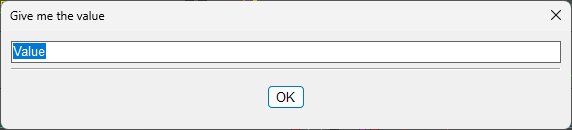
The form is Input(Title,Default,line)
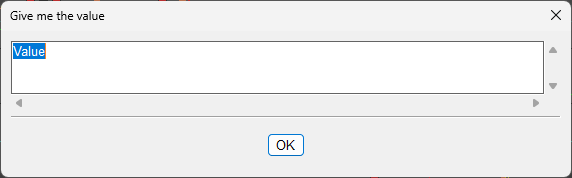
If we change the line value to 3, it will give us 3 line input fields.
Use cases
Prompting for a stop price
Although we can define the stop price by clicking on the chart, some people might prefer to type in the stop price instead.
$StopShort=Input("Enter Stop Price",Price,1);Preparing a breakout trade with stop loss
For this, we need to think ahead a bit and prepare the entry hotkey with the variables that will be prompted and then call an alert creation with the predefined values.
Let's create a hotkey and name it FElong (meaning Future Entry Long)
$montage.Symb=$FESymbolLong;
$montage.Share=$FESharesLong;
$montage.Route="LIMIT";
$montage.Price=ROUND($FEBreakLong*1.0015,2);
$montage.TIF="DAY+";
$montage.BUY=Send;
$MONTAGE.TriggerOrder=RT:STOP STOPTYPE:MARKET PX:$FEStopLong ACT:SELL STOPPRICE:$FEStopLong QTY:Pos TIF:DAY+;
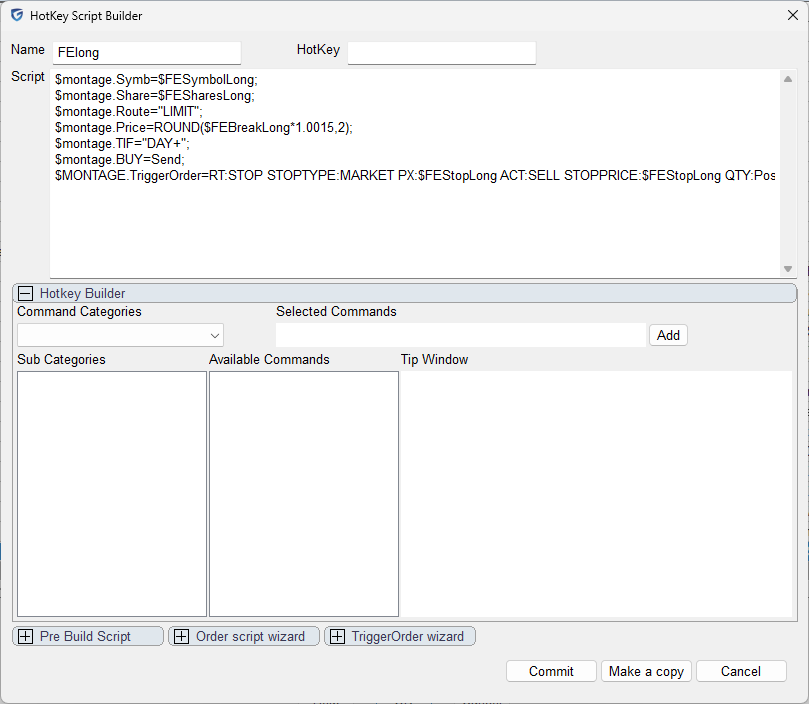
Then let's create an entry hotkey with the prompts
//define risk
$FERisk=10;
//calculate variables
$FESymbolLong=$montage.Symb;
$FEStopLong=Input("Enter Stop Price",$montage.last-0.5,1);
$FEBreakLong=Input("Enter Break Price",$montage.last+0.5,1);
$FESharesLong=ROUND($FERisk/($FEBreakLong-$FEStopLong));
//create the alert object
$MYALERT=NewAlertObj();
$MYALERT.name="Entry Long "+$FESymbolLong;
$MYALERT.AddItem("Last Sale",">",$FEBreakLong);
$MYALERT.Speak=1;
$MYALERT.SYMB=$FESymbolLong;
$MYALERT.PlaySound=0;
$MYALERT.Autodelete=1;
$MYALERT.Loop=0;
$MYALERT.Script="$montage.symbol="+$FESymbolLong+";$montage.exechotkey\(\"FELong\"\);";
$MYALERT.save();
Adapt the risk at the top for the desired amount. In this case the prompt will ask us to enter the stop price and the breakout price when we want to enter. This is very useful for preparing entries for swing trades or high-of-the-day break-outs, etc.
Here is the hotkey in action.
- Press the hotkey
- Enter the prompts for the stop price and the breakout price.
- See how it creates an alert with action to call the FELong hotkey
- The FELong hotkey is called when the price action is higher than the breakout price
- Automatic stop loss to the desired stop price is set
For completion, here is the FEShort hotkey
$montage.Symb=$FESymbolShort;
$montage.Share=$FESharesShort;
$montage.ROUTE="LIMIT";
$montage.Price=ROUND($FEBreakShort*0.9985,2);
$montage.TIF="DAY+";
$montage.SELL=Send;
$MONTAGE.TriggerOrder=RT:STOP STOPTYPE:MARKET PX:$FEStopShort ACT:BUY STOPPRICE:$FEStopShort QTY:Pos TIF:DAY+;
And the corresponding entry hotkey with the prompts
//define risk
$FERisk=10;
//calculate variables
$FESymbolShort=$montage.Symb;
$FEStopShort=Input("Enter Stop Price",$montage.last+0.5,1);
$FEBreakShort=Input("Enter Break Price",$montage.last-0.5,1);
$FESharesShort=ROUND($FERisk/($FEStopShort-$FEBreakShort));
//create the alert object
$MYALERT=NewAlertObj();
$MYALERT.name="Entry Short "+$FESymbolShort;
$MYALERT.AddItem("Last Sale","<",$FEBreakShort);
$MYALERT.Speak=1;
$MYALERT.SYMB=$FESymbolShort;
$MYALERT.PlaySound=0;
$MYALERT.Autodelete=1;
$MYALERT.Loop=0;
$MYALERT.Script="$montage.symbol="+$FESymbolShort+";$montage.exechotkey\(\"FEShort\"\);";
$MYALERT.save();
Here is the short hotkey in action
Prompting for a date
This is my personal real-life usage example
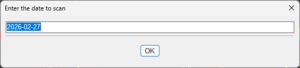
Which I use for running backtests for a specific date
The prompt consists of some data preparations first, as the pre-defined value is always "today"
$TDATE=substring(getwindowobj("MY1MIN").getbar(0).time,0,4)+"-"+substring(getwindowobj("MY1MIN").getbar(0).time,4,6)+"-"+substring(getwindowobj("MY1MIN").getbar(0).time,6,8);
$CANDLESTART=Input("Enter the date to scan",$TDATE,1);
The $TDATE variable reads the current 1-minute chart time and trims the time from it so that only the date remains.
For more advanced scripting, you can visit my Substack - Peter's Substack where I elaborate on the newest features, ideas and do custom solutions for specific needs.
Author: PeterB
Disclosure Statement 1. Hotkey scripts should always be thoroughly tested in a paper trading environment prior to any live deployment. Guardian Trading assumes no responsibility for errors, malfunctions, or financial losses arising from the use, misuse, or modification of custom hotkey configurations. Traders are solely responsible for the creation, testing, and implementation of their own scripts.This guide is provided for informational and educational purposes only and does not constitute trading advice or an endorsement of any specific configuration. The examples herein are illustrative in nature and should not be copied, replicated, or relied upon without independent verification and testing. Use of this material constitutes acknowledgment and acceptance of these terms.
2. No information provided by Velocity Clearing, LLC (“Velocity” or the “Firm”), directly or indirectly, should be considered a recommendation or solicitation to adopt any particular trading or investment strategy or to invest in, or liquidate, a particular security or type of security. Information provided by Velocity on its Twitter, Facebook or Blog pages is for informational and educational purposes only and is not intended as a recommendation of any particular security, transaction or strategy. Commentary and opinions expressed are those of the author/speaker and not necessarily those of the Firm. Velocity does not guarantee the accuracy of, or endorse, the statements of any third party, including guest speakers or authors of commentary or news articles. All information regarding the likelihood of potential future investment outcomes are hypothetical. Future results are never guaranteed. Any examples that discuss potential trading profits or losses may not take into account trading commissions or fees, which means that potential profits could be lower and potential losses could be greater than illustrated in any example. Users are solely responsible for making their own, independent decisions about whether to use any of the research, tools or information provided, and for determining their own trading and investment strategies.