

I used to struggle with forgetting some of the rules for my entries. I was able to get around it with the help of a simple solution - a green light button for entries.
It is working in a few steps
- Check if my condition is met
- Change the color of the button to green if yes or to grey if not
Since the DAS Trader Pro version
The condition needs to be mathematically exact. To get an idea of what the possibilities are, here are some examples that I use every day.
- If the previous candle type was a doji
- If the 50 SMA is above VWAP
- If the price action is more than double the ATR(14) above the 9EMA
- If the parabolic SAR indicator is above the 9EMA
- If there are 3 higher highs on the 5-minute chart
These are all quite specific, so let me show an example of a red/green light for a condition that is like this:
Show a red light if the symbol today has already reached its daily ATR(14). Otherwise, show a green light.
Meaning, I want to be alerted on the chart that the symbol has already reached its ATR and that I should not expect a bigger move (or that I shall start looking for a reversal).
The semaphore button
Create a named button on a named chart window
For this purpose I choose the 1-minute chart, but it can be any chart window.
Name the indicator in a named chart window
We need to place the ATR indicator into the daily chart window and name both the chart window and the indicator.
The chart window name is MYDAILY and the ATR study name is MYATR
Create the hotkey
The hotkey will read the ATR variable from the named daily chart, check if the condition is met and address the named chart window and the named button for changing its background color.
save the hotkey as h_atr_check
// read the ATR value
$THEATR=getwindowobj("MYDAILY").getstudyval("MYATR");
// read todays HI and LO difference
$TODAYSDIFF=ABS($MONTAGE.HI-$MONTAGE.LO);
// compare if todays HI vs LO is greater than ATR
if ($TODAYSDIFF>=$THEATR)
{
// color the button RED
getwindowobj("MY1MIN").GetCustButObj("B_SEMA1").bkcolor="red";
// change button text
getwindowobj("MY1MIN").GetCustButObj("B_SEMA1").text="ATR reached";
}
else
{
// color the button GREEN
getwindowobj("MY1MIN").GetCustButObj("B_SEMA1").bkcolor="green";
// change button text
getwindowobj("MY1MIN").GetCustButObj("B_SEMA1").text="ATR not reached";
}
Call the hotkey in the timer event script
By calling the hotkey in the timer event script, we achieve every second update for the conditions check. It is enough to do so every second. For other types of checks, it can be once a minute or once in 5 minutes, which can be solved with some advanced scripting too, but that will be covered in a different article. Place this code into the timer event script
$montage.exechotkey("h_atr_check");Test it
Clicking trhough the watchlist will give us automated change of the button color and text based on the condition.
The semaphore background
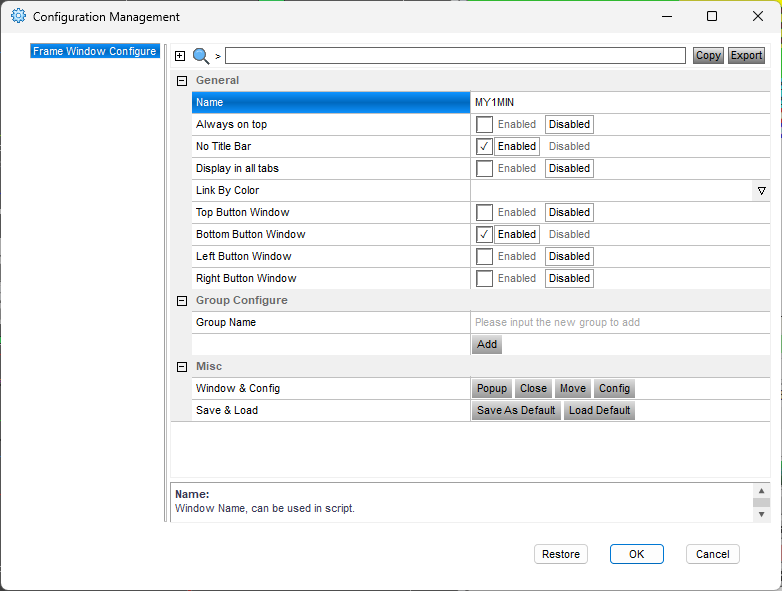
Since the version of DAS Trader Pro 5.8.2.1, we can change the color of the chart background or chart axis with a script.
Name the chart window that should act as the semaphore.
Create the hotkey
This hotkey is very similar it just changes the color of the chart background instead of the color of the button. Name the hotkey h_atr_check.
// h_atr_check
// read the ATR value
$THEATR=getwindowobj("MYDAILY").getstudyval("MYATR");
// read todays HI and LO difference
$TODAYSDIFF=ABS($MONTAGE.HI-$MONTAGE.LO);
// compare if todays HI vs LO is greater than ATR
if ($TODAYSDIFF>=$THEATR)
{
// color the chart RED
getwindowobj("MY1MIN").Backgroundcolor="174,74,74";
}
else
{
// color the chart GREY
getwindowobj("MY1MIN").Backgroundcolor="74,74,74";
}
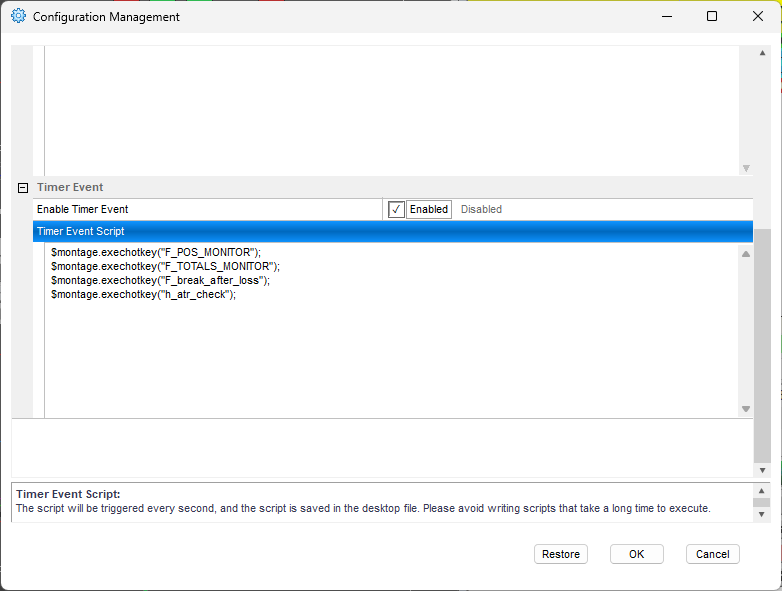
Call the hotkey in the timer event script
This is the same as before, just add the line to call the hotkey in the timer event script.
Test it
By clicking through the watch list, see how the background is telling you to stay away from entering.
The conditions can be combined into multi-level checks, so if your entry rules are very complex, it can make your life much easier, and you can skip those unwanted entries.
Anything that can be read or calculated can become a color signal, or a blocker to avoid unwanted entries.
For more advanced scripting, you can visit my Substack - Peter's Substack where I elaborate on the newest features, ideas and do custom solutions for specific needs.
Author: PeterB
Disclosure Statement 1. Hotkey scripts should always be thoroughly tested in a paper trading environment prior to any live deployment. Guardian Trading assumes no responsibility for errors, malfunctions, or financial losses arising from the use, misuse, or modification of custom hotkey configurations. Traders are solely responsible for the creation, testing, and implementation of their own scripts.This guide is provided for informational and educational purposes only and does not constitute trading advice or an endorsement of any specific configuration. The examples herein are illustrative in nature and should not be copied, replicated, or relied upon without independent verification and testing. Use of this material constitutes acknowledgment and acceptance of these terms.
2. No information provided by Velocity Clearing, LLC (“Velocity” or the “Firm”), directly or indirectly, should be considered a recommendation or solicitation to adopt any particular trading or investment strategy or to invest in, or liquidate, a particular security or type of security. Information provided by Velocity on its Twitter, Facebook or Blog pages is for informational and educational purposes only and is not intended as a recommendation of any particular security, transaction or strategy. Commentary and opinions expressed are those of the author/speaker and not necessarily those of the Firm. Velocity does not guarantee the accuracy of, or endorse, the statements of any third party, including guest speakers or authors of commentary or news articles. All information regarding the likelihood of potential future investment outcomes are hypothetical. Future results are never guaranteed. Any examples that discuss potential trading profits or losses may not take into account trading commissions or fees, which means that potential profits could be lower and potential losses could be greater than illustrated in any example. Users are solely responsible for making their own, independent decisions about whether to use any of the research, tools or information provided, and for determining their own trading and investment strategies.