

Until version 5.8.2.5 of DAS Trader Pro, retrieving a historical value of a study was possible as described in the previous post
https://www.guardiantrading.com/das-trader-pro-reading-study-values ,
msgbox(getwindowobj(NAME).getstudyval("MYEMA11","bybarnum",-3));
which resulted in a text string
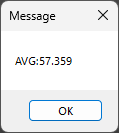
that required a string-to-number conversion afterward.
Since every newer version above 5.8.2.5, we can use a direct retrieval as a number by adding a fourth parameter to the getstudyval() function.
The fourth parameter
the fourth parameter is "number", which does the conversion to a number straightforwardly without the need to add the special code
The usage is as following example:
msgbox(getwindowobj(NAME).getstudyval("MYEMA11","bybarnum",-3,"number"));
A real life example
Let's say that our strategy is a trend continuation strategy, which needs to be confirmed by a moving average sloping up for a long position to confirm the uptrend.
If we want to determine if a moving average is sloping up or down, for our eyes it is an easy task - look and see. But to determine it in a script, it is a bit of a different story. We need to ask the chart if the value now is higher or lower than the value X candles back.
For this real-life example, let's take 3 measurements for a moving average.
- now
- 5 candles back
- 10 candles back
If the value of now is higher than the value 5 candles back and the value 5 candles back is higher than the value 10 candles back, we can say that the moving average is sloping up.
Graphically it looks like this
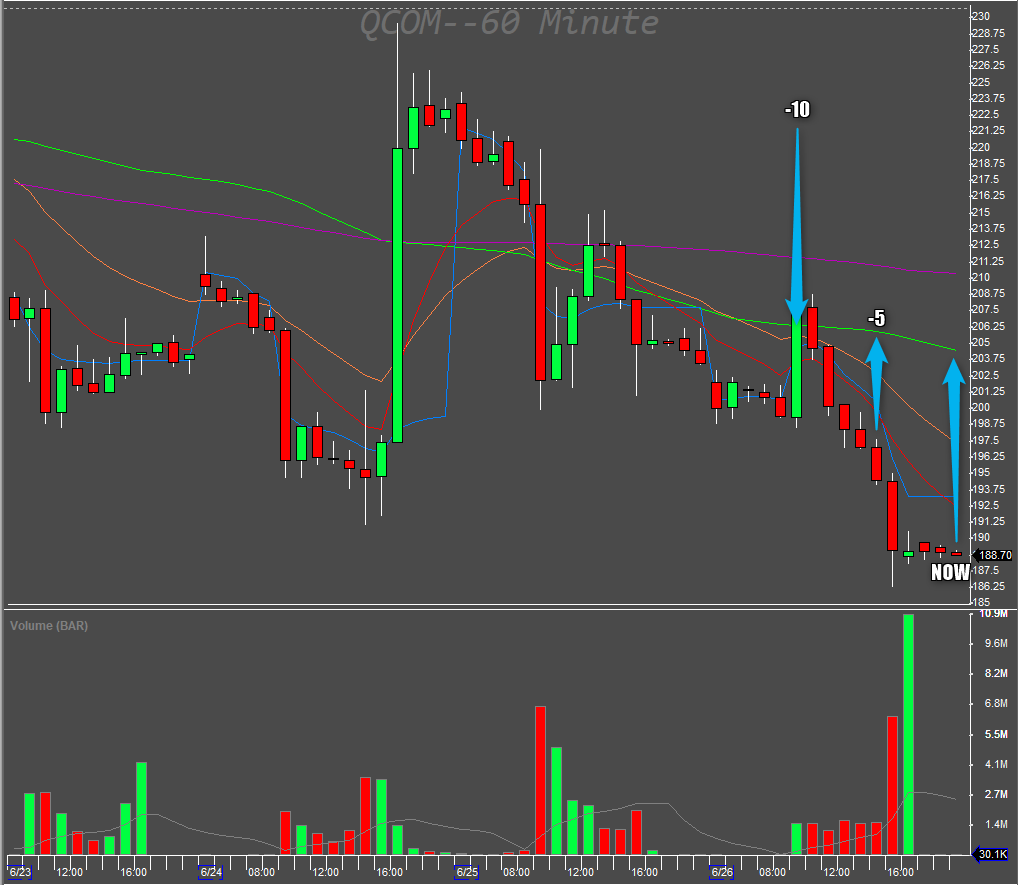
Let's prepare the chart.
First, we add the button for the functionality. This is purely for display purposes. Usually the code to determine the slope will be ran in a chart update script or in a hotkey that will do the determination for us.
Then we need to name the moving average. In this case, it is the green moving average study that needs to be named. The default names for all studies are the same, so it has to be a unique name for the chart window. MY50SMA is the name in our example.
The code for the newly created button goes as below:
Note: At the time of writing, the function had a bug, and the resulting value was still a string-hence the conversion with the round function.
$valNOW=getwindowobj(NAME).getstudyval("MY50SMA","bybarnum",0,"number");
$valNOW=ROUND($valNOW,4);
$val5=getwindowobj(NAME).getstudyval("MY50SMA","bybarnum",-5,"number");
$val5=ROUND($val5,4);
$val10=getwindowobj(NAME).getstudyval("MY50SMA","bybarnum",-10,"number");
$val10=ROUND($val10,4);

if($valnow>$val5)
{
if($val5>$val10)
{
msgbox("The green 50SMA is sloping UP");
}
}
if($valnow<$val5)
{
if($val5<$val10)
{
msgbox("The green 50SMA is sloping DOWN");
}
}
To make it part of a hotkey to go long, we determine the slope and display the message if trying to go long on a down-sloping MA instead of allowing the entry.
$valNOW=getwindowobj(NAME).getstudyval("MY50SMA","bybarnum",0,"number");
$valNOW=ROUND($valNOW,4);
$val5=getwindowobj(NAME).getstudyval("MY50SMA","bybarnum",-5,"number");
$val5=ROUND($val5,4);
$val10=getwindowobj(NAME).getstudyval("MY50SMA","bybarnum",-10,"number");
$val10=ROUND($val10,4);
if($valnow>$val5)
{
if($val5>$val10)
{
// the entry hotkey goes here
$MONTAGE=GetWindowObj("MONTAGE1");
$MONTAGE.CXL ALLSYMB;
$buyprice=$MONTAGE.Ask;
$risk=GetAccountObj($MONTAGE.ACCOUNT).openEQ/800;
$mystop=$MONTAGE.price;
setvar("STOP_"+SYMB,$MYSTOP);
$pricetostop=$buyprice-$mystop;
$target=3*$pricetostop+Ask;
$amount=$risk/$pricetostop;
$MONTAGE.Share=$amount;
$MONTAGE.ROUTE="LIMIT";
$MONTAGE.Price=Round($buyprice,2);
$MONTAGE.TIF=DAY+;
$MONTAGE.BUY;
$MONTAGE.TriggerOrder=RT:STOP STOPTYPE:RANGEMKT LowPrice:$mystop HighPrice:$target ACT:SELL QTY:POS TIF:DAY+;
}
}
if($valnow<$val5)
{
if($val5<$val10)
{
// the denial message goes here
msgbox("No long entries on a down trend!");
}
}This will check if the condition of "The 50 moving average needs to slope up for long positions."
And just like that, we can do automatic checks for any readable study trends.
For more advanced scripting, you can visit my Substack - Peter's Substack where I elaborate on the newest features, ideas and do custom solutions for specific needs.
Author: PeterB
Disclosure Statement 1. Hotkey scripts should always be thoroughly tested in a paper trading environment prior to any live deployment. Guardian Trading assumes no responsibility for errors, malfunctions, or financial losses arising from the use, misuse, or modification of custom hotkey configurations. Traders are solely responsible for the creation, testing, and implementation of their own scripts.This guide is provided for informational and educational purposes only and does not constitute trading advice or an endorsement of any specific configuration. The examples herein are illustrative in nature and should not be copied, replicated, or relied upon without independent verification and testing. Use of this material constitutes acknowledgment and acceptance of these terms.
2. No information provided by Velocity Clearing, LLC (“Velocity” or the “Firm”), directly or indirectly, should be considered a recommendation or solicitation to adopt any particular trading or investment strategy or to invest in, or liquidate, a particular security or type of security. Information provided by Velocity on its Twitter, Facebook or Blog pages is for informational and educational purposes only and is not intended as a recommendation of any particular security, transaction or strategy. Commentary and opinions expressed are those of the author/speaker and not necessarily those of the Firm. Velocity does not guarantee the accuracy of, or endorse, the statements of any third party, including guest speakers or authors of commentary or news articles. All information regarding the likelihood of potential future investment outcomes are hypothetical. Future results are never guaranteed. Any examples that discuss potential trading profits or losses may not take into account trading commissions or fees, which means that potential profits could be lower and potential losses could be greater than illustrated in any example. Users are solely responsible for making their own, independent decisions about whether to use any of the research, tools or information provided, and for determining their own trading and investment strategies.