

Symbol properties
Sometimes we need to use a different approach for symbols that are on SSR or that are hard to borrow. For this purpose, the getquoteobj() function will retrieve all the information about the symbol.
Note: The properties are being added with each version of DAS Trader Pro, so make sure you use the latest one to get the most out of the feature.
To get quick information about a symbol, we can call the getquoteobj() function and show the object variable like this.
$QUOTE=getquoteobj("AMD");
$QUOTE.showobject();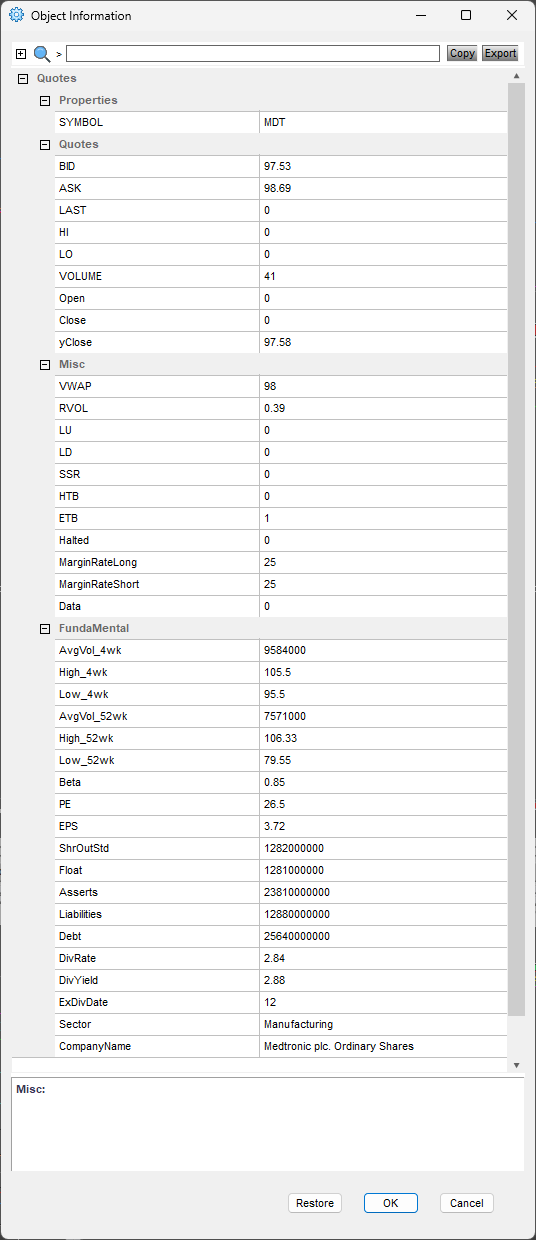
Now, to get the value of the above properties, we just need to address that property by its name. If we need to read RVOL we can call it
$RVOL=getquoteobj($montage.Symb).RVOL;
msgbox($RVOL);
which gives us
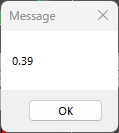
In this way we can quickly display the symbol properties we are interested in or work with the properties in our scripts later on.
Notice that
$QUOTE=getquoteobj($montage.Symb);
msgbox($QUOTE.RVOL);
and
$RVOL=getquoteobj($montage.Symb).RVOL;
msgbox($RVOL);
and also
msgbox(getquoteobj($montage.Symb).RVOL);
are interchangeable, so we can use any of the forms we prefer for the readability of our scripts.
More use cases
Based on the properties of the symbol we trade, we can add the conditional behavior for our entry or exit hotkey scripts.
HTB
If a symbol is hard to borrow, it has HTB property set to 1 and ETB property set to 0, and vice versa. In this situation, we must locate the shares first as described in the previous post
DAS Trader Pro Autolocate with hotkeys
if ($QUOTE.HTB==1)
{
$Montage.exechotkey("Autolocate");
//the usual entry code
}
else
{
//the usual entry code
}
SSR
If a symbol is in short selling restriction, it has SSR property set to 1. In that case we have to enter our short positions on the Ask, rather than the Bid
if ($QUOTE.SSR==1)
{
// the usual entry code
$montage.Price=Ask;
// send the order code
}
else
{
// the usual entry code
$montage.Price=Bid;
// send the order code
}
Halted
If a symbol has been halted during the day, it has the halted property set to 1. We might need to use a different route for the symbol based on the halted flag, like this:
if ($QUOTE.Halted==1)
{
//the usual entry code
$Montage.route="Special Route";
// send the order code
}
else
{
//the usual entry code
$Montage.route="Standard Route"
// send the order code
}
Author: PeterB
Disclosure Statement 1. Hotkey scripts should always be thoroughly tested in a paper trading environment prior to any live deployment. Guardian Trading assumes no responsibility for errors, malfunctions, or financial losses arising from the use, misuse, or modification of custom hotkey configurations. Traders are solely responsible for the creation, testing, and implementation of their own scripts.This guide is provided for informational and educational purposes only and does not constitute trading advice or an endorsement of any specific configuration. The examples herein are illustrative in nature and should not be copied, replicated, or relied upon without independent verification and testing. Use of this material constitutes acknowledgment and acceptance of these terms.
2. No information provided by Velocity Clearing, LLC (“Velocity” or the “Firm”), directly or indirectly, should be considered a recommendation or solicitation to adopt any particular trading or investment strategy or to invest in, or liquidate, a particular security or type of security. Information provided by Velocity on its Twitter, Facebook or Blog pages is for informational and educational purposes only and is not intended as a recommendation of any particular security, transaction or strategy. Commentary and opinions expressed are those of the author/speaker and not necessarily those of the Firm. Velocity does not guarantee the accuracy of, or endorse, the statements of any third party, including guest speakers or authors of commentary or news articles. All information regarding the likelihood of potential future investment outcomes are hypothetical. Future results are never guaranteed. Any examples that discuss potential trading profits or losses may not take into account trading commissions or fees, which means that potential profits could be lower and potential losses could be greater than illustrated in any example. Users are solely responsible for making their own, independent decisions about whether to use any of the research, tools or information provided, and for determining their own trading and investment strategies.