

If you are trading any strategies that have technical targets in the form of any indicator (which is called study in DAS Trader Pro), you might find this useful.
Objectives
Exit the trade when VWAP is reached.
Use single button solution to control the functionality
Challenges
As you know, VWAP is a dynamic study constantly changed with price. So it is not enough to read the VWAP and set the profit target order to that price at the time of an entry.
The solution
To achieve our objective, we will need a few things
- An alert that will monitor the price against the VWAP. This is already pre-built functionality into DAS Trader Pro
- An exit hotkey that will liquidate the position when the VWAP is reached and that will do nothing if the VWAP is reached while no position is opened
- A button that will enable or disable the functionality
- A script that will check if we have the functionality enabled or disabled and indicate it with a color
Alert that will monitor the price action against VWAP
This can be done manually
If we want to do it quickly, the script is the way to go.
$MYPOS=GetAccountObj($MONTAGE.account).getposition($MONTAGE.symb).share;
$MYALERT=NewAlertObj();
$MYALERT.name="VWAP REACHED "+$MONTAGE.SYMB;
if($MYPOS==0)
{
return;
}
if($MYPOS<0)
{
$MYALERT.AddItem("Last Sale",">",VWAP);
}
if($MYPOS>0)
{
$MYALERT.AddItem("Last Sale","<",VWAP);
}
//call standard exit hotkey
$MYALERT.Script="$montage.symbol="+$MONTAGE.SYMB+";$montage.exechotkey\(\"EXIT\"\);";
$MYALERT.Speak=0;
$MYALERT.SYMB=$MONTAGE.SYMB;
$MYALERT.PlaySound=0;
$MYALERT.Autodelete=0;
$MYALERT.Loop=0;
$MYALERT.PopupWindow=0;
$MYALERT.save();
To add more functionality than just a simple alert creation, we can create a nice button that will show us th
Creating the functionality button
To add the functionality, we will need a window button.
if($VWAPTARGETENABLED==1)
{
$loop=10;
while ($loop>0)
{
$TODELALERT=GetAlertObj("VWAP REACHED");
if (IsObj($TODELALERT))
{
$TODELALERT.delete();
}
$loop=$loop-1;
}
$VWAPTARGETENABLED=0;
}
else
{
$VWAPTARGETENABLED=1;
$MYPOS=GetAccountObj($MONTAGE.account).getposition($MONTAGE.symb).share;
if($MYPOS==0)
{
return;
}
$MYALERT=NewAlertObj();
$MYALERT.name="VWAP REACHED";
if($MYPOS<0)
{
$MYALERT.AddItem("Last Sale",">","VWAP");
}
if($MYPOS>0)
{
$MYALERT.AddItem("Last Sale","<","VWAP");
}
//call standard exit hotkey
$MYALERT.Script="$montage.symbol="+$MONTAGE.SYMB+";$montage.exechotkey\(\"EXIT\"\);";
$MYALERT.Speak=0;
$MYALERT.SYMB=$MONTAGE.SYMB;
$MYALERT.PlaySound=0;
$MYALERT.Autodelete=0;
$MYALERT.Loop=0;
$MYALERT.PopupWindow=0;
$MYALERT.save();
}
This code effectively checks if the alert variable is enabled or not. If it is enabled it will disable it and delete the alert by the name. If it is disabled, it will enable it and create a new alert.
Prepare the exit hotkey
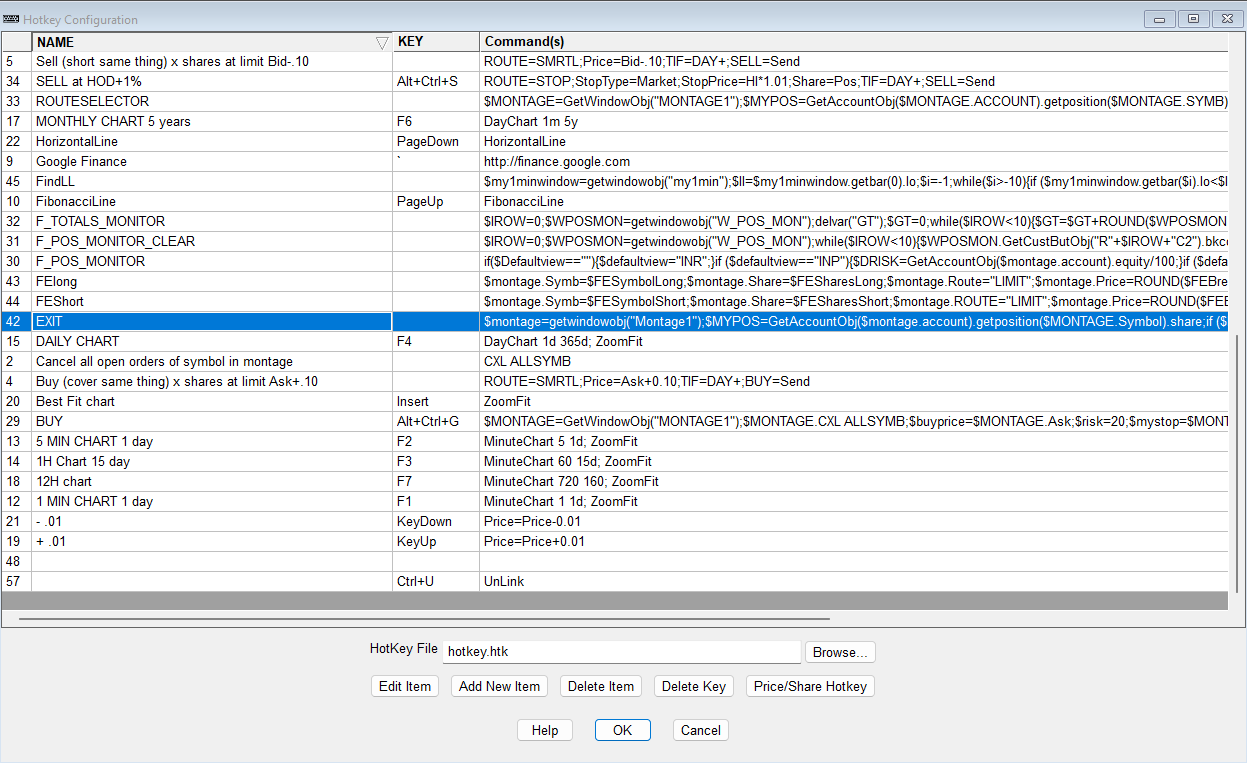
This is the standard universal exit hotkey as described in the post https://www.guardiantrading.com/das-trader-pro-universal-exit-hotkey-function-for-all-market-hours/
$montage=getwindowobj("Montage1");
$MYPOS=GetAccountObj($montage.account).getposition($MONTAGE.Symbol).share;
if ($MYPOS==0)
{
MsgBox("No position to close");
}
else
{
$MONTAGE.CXL ALLSYMB;
if ($MYPOS>0)
{
$Montage.price=$montage.last*0.98;
}
else
{
$Montage.price=$montage.last*1.02;
}
if ($MONTAGE.price>=1)
{
$MONTAGE.Price=Round($Montage.price,2);
}
else
{
$MONTAGE.Price=Round($Montage.price,4);
}
//set your exit route
$MONTAGE.ROUTE="LIMIT";
$MONTAGE.Share=$MONTAGE.POS;
$MONTAGE.Send=Reverse;
}
Just make sure the hotkey is named EXIT in your hotkeys list
Creating the alert monitoring function
This function will check if we have an alert with the specified VWAP name and indicate it with a color on our newly created button. It is not mandatory and if you are ok to keep watching your alerts window for the alert presence, you do not need it.
Create a hotkey and name it check_vwap_alert
$VWAPALERT=GetAlertObj("VWAP REACHED");
if (isobj($VWAPALERT))
{
getwindowobj("my1min").GetCustButObj("b_vwap_target").bkcolor="green";
if ($VWAPALERT.Triggered==1)
{
getwindowobj("my1min").GetCustButObj("b_vwap_target").bkcolor="gray";
}
}
else
{
getwindowobj("my1min").GetCustButObj("b_vwap_target").bkcolor="gray";
}
This hotkey checks every second if an untriggered alert named VWAP REACHED exists.If it does, it will paint the control button green, otherwise it will paint it grey.
After the hotkey is saved, we need to run it every second, which is done in the timer event script window.
The solution in action
To enable or disable the alert, just press the button.
Once the VWAP target is reached, the alert triggers, calls the symbol change on the montage, calls the exit hotkey and sets the triggered state to YES which gets detected by the check_vwap_alert script which paints the button grey.
In case the alert exists, while there is no position opened, nothing will happen because the EXIT hotkey has a position check parameter.
You can keep your existing stop loss or range order in place. The existing orders for the symbol will be canceled by the EXIT hotkey automatically too.
Similarly, when there is no position opened and you press the create alert button, it will not create the alert and any potential leftover alert will get automatically cleaned with the next press of the button.
The limits
The limits of this solution are that the PC and the DAS Trader Pro need to be running, as all the logic is present at the PC not at the broker. That means that the price is being monitored on your pc and the exit is triggered only once the program on your PC detected the price change.
A bit different solution
There is a bit of a different solution available to achieve the same thing. We can monitor a global variable for its value like this.
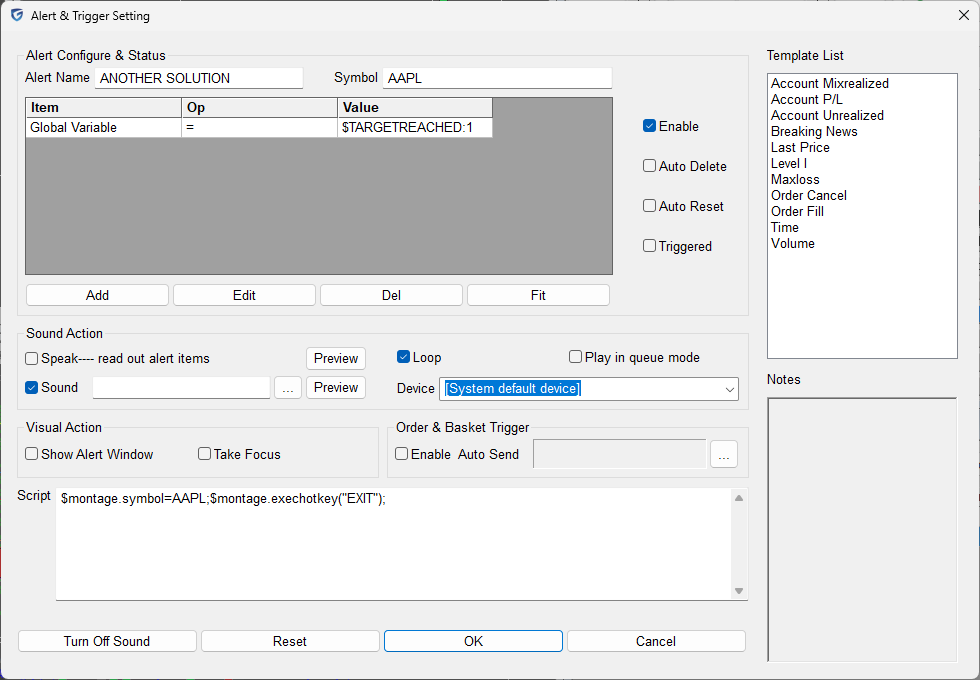
That leaves it up to us to calculate the $TARGETREACHED variable constantly in a chart update script by reading the current price and comparing it to the vwap.
It is a much more complicated solution that requires bulletproof code to cover all situations at once, but it might be more usable than the previous one. Especially in multi position monitoring scenarios.
For more advanced scripting, You can visit my substack - Peter's Substack where I elaborate on the newest features, ideas and do custom solutions for specific needs.
Author: PeterB
Disclosure Statement 1. Hotkey scripts should always be thoroughly tested in a paper trading environment prior to any live deployment. Guardian Trading assumes no responsibility for errors, malfunctions, or financial losses arising from the use, misuse, or modification of custom hotkey configurations. Traders are solely responsible for the creation, testing, and implementation of their own scripts.This guide is provided for informational and educational purposes only and does not constitute trading advice or an endorsement of any specific configuration. The examples herein are illustrative in nature and should not be copied, replicated, or relied upon without independent verification and testing. Use of this material constitutes acknowledgment and acceptance of these terms.
2. No information provided by Velocity Clearing, LLC (“Velocity” or the “Firm”), directly or indirectly, should be considered a recommendation or solicitation to adopt any particular trading or investment strategy or to invest in, or liquidate, a particular security or type of security. Information provided by Velocity on its Twitter, Facebook or Blog pages is for informational and educational purposes only and is not intended as a recommendation of any particular security, transaction or strategy. Commentary and opinions expressed are those of the author/speaker and not necessarily those of the Firm. Velocity does not guarantee the accuracy of, or endorse, the statements of any third party, including guest speakers or authors of commentary or news articles. All information regarding the likelihood of potential future investment outcomes are hypothetical. Future results are never guaranteed. Any examples that discuss potential trading profits or losses may not take into account trading commissions or fees, which means that potential profits could be lower and potential losses could be greater than illustrated in any example. Users are solely responsible for making their own, independent decisions about whether to use any of the research, tools or information provided, and for determining their own trading and investment strategies.