

Often we need to put some notes on the symbols, being either warnings, whole trade plans, or just any other note.
3 types of notes
There are 3 types of notes as of today, if I do not count any text you can write into a button by editing it. Although it is a valid way, there are other ways that are even more efficient.
1. The chart notes
As the title suggests, these exist on the charts. They exist for ages and are not very practical, imho, but they might still be useful.
The main disadvantage of these is their placement. Once you draw them, they remain at the place. It is good for daily or weekly charts, but on smaller time frame charts, they will be gone and forgotten easily.
They are configurable a little, in colors and shape too.
They can be created and read with scripts, and there can be practically hundreds of them set.
2. The watchlist notes
These have been around for some time but are quite unfinished, as they cannot be written or read by scripts.
Affecting the width of your watchlist window, they are good for some short notes like A, B, C to measure the quality of your liking of the symbol for the day, and later on you can order the symbol by the column.
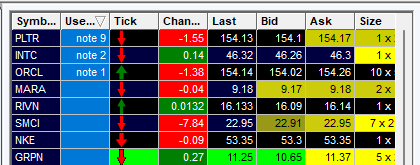
The sorting of symbols by notes is their biggest advantage.
3. The symbol notes
These are the newest and are very hidden and invisible, as they are virtual and nowhere to be seen on the screen.
setSymbolNote(SYMBOL,"NAME OF THE NOTE","THE TEXT OF THE NOTE");
We can define as many as we like per symbol and define them by name.
setSymbolNote(AAPL,"WEEKLY NOTE","Stay away because of earnings this week");

setSymbolNote(AAPL,"DAILY NOTE","Go short if it breaks 199 level");
How do we make it useful?
If we set it and it is nowhere to be seen, what is it good for?
Let's create a wide button under the chart.
The script code that I placed into the button is
$MYTEMPNOTE=input("Input the note for "+SYMB,getSymbolNote(SYMB,"DAILYNOTE"),1);
setSymbolNote(SYMB,"DAILYNOTE",$MYTEMPNOTE);
GetWindowObj(NAME).GetCustButObj("b_symbol_notes").bkcolor="gray";
GetWindowObj(NAME).GetCustButObj("b_symbol_notes").text=getSymbolNote(SYMB,"DAILYNOTE");
if(getSymbolNote(SYMB,"DAILYNOTE")!="")
{
GetWindowObj(NAME).GetCustButObj("b_symbol_notes").bkcolor="yellow";
}
I named the note DAILYNOTE and will be using that name later on to read it.
It does the following:
- Prompts the user for the input and stores it into the $MYTEMPNOTE variable
- Sets the symbol note to the $MYTEMPNOTE value for the current symbol on the chart
- Sets the background of the button to yellow if the note is set or to gray if it is not set.
Pretty straightforward so far. But there is a problem, as the text on the button remains the same even if we change the symbols.
We need to add some code to the chart update script that will do:
- Detect if there is a change of the chart symbol
- If the symbol has changed, read the symbol note
- Replace the text and color of the button under the chart
The script code in the chart update script is
//run if symbol has changed
if($CURRSYMBOL!=GetWindowObj(NAME).SYMB)
{
$CURRSYMBOL=SYMB;
GetWindowObj(NAME).GetCustButObj("b_symbol_notes").text=getSymbolNote(SYMB,"DAILYNOTE");
if(getSymbolNote(SYMB,"DAILYNOTE")=="")
{
GetWindowObj(NAME).GetCustButObj("b_symbol_notes").bkcolor="gray";
}
else
{
GetWindowObj(NAME).GetCustButObj("b_symbol_notes").bkcolor="yellow";
}
}
Both scripts are chart-type independent, and no naming of the chart window is needed. You can choose any chart window (excluding the new ChartEX type), and it will work the same. Daily, hourly, wherever you have enough width to display your longer notes.
Note deletion
To delete a note, simply input an empty string by deleting the current note.
A working example
In the video above, you can see that with just 2 scripts, we get a whole new, very useful functionality for a small price of screen space.
For more advanced scripting, you can visit my Substack - Peter's Substack where I elaborate on the newest features, ideas and do custom solutions for specific needs.
Author: PeterB
Disclosure Statement 1. Hotkey scripts should always be thoroughly tested in a paper trading environment prior to any live deployment. Guardian Trading assumes no responsibility for errors, malfunctions, or financial losses arising from the use, misuse, or modification of custom hotkey configurations. Traders are solely responsible for the creation, testing, and implementation of their own scripts.This guide is provided for informational and educational purposes only and does not constitute trading advice or an endorsement of any specific configuration. The examples herein are illustrative in nature and should not be copied, replicated, or relied upon without independent verification and testing. Use of this material constitutes acknowledgment and acceptance of these terms.
2. No information provided by Velocity Clearing, LLC (“Velocity” or the “Firm”), directly or indirectly, should be considered a recommendation or solicitation to adopt any particular trading or investment strategy or to invest in, or liquidate, a particular security or type of security. Information provided by Velocity on its Twitter, Facebook or Blog pages is for informational and educational purposes only and is not intended as a recommendation of any particular security, transaction or strategy. Commentary and opinions expressed are those of the author/speaker and not necessarily those of the Firm. Velocity does not guarantee the accuracy of, or endorse, the statements of any third party, including guest speakers or authors of commentary or news articles. All information regarding the likelihood of potential future investment outcomes are hypothetical. Future results are never guaranteed. Any examples that discuss potential trading profits or losses may not take into account trading commissions or fees, which means that potential profits could be lower and potential losses could be greater than illustrated in any example. Users are solely responsible for making their own, independent decisions about whether to use any of the research, tools or information provided, and for determining their own trading and investment strategies.