

The Importance of Risk Controls
The primary objective is to avoid catastrophic account losses caused by unexecuted stop-losses. Anyone trading on DAS Trader Pro ought to utilize built-in risk controls to safeguard their accounts. For me, these native risk management features are the top reason for using the platform.
Despite their benefits, native risk controls carry a few significant shortcomings:
Extended Hours Delays: During non-standard trading hours, these controls often appear to be managed manually by human operators. Depending on your broker, risk managers may act late or fail to intervene entirely. This delay allows your losses to exceed your established maximum loss threshold. A dangerous situation if you freeze up or lose discipline.
Order Cancellation Slippage: The risk management mechanism cancels all active orders before liquidating your position. If you already have an effective stop-loss order placed, cancelling it first can cause severe slippage, as the price continues moving past your target price before the forced market exit completes.
Additional Requirements Beyond Standard Hotkey Setup
In addition to the standard advanced hotkey configurations typically required in DAS Trader Pro https://www.guardiantrading.com/how-to-prepare-your-das-trader-pro-for-advanced-hotkeys-scripting/
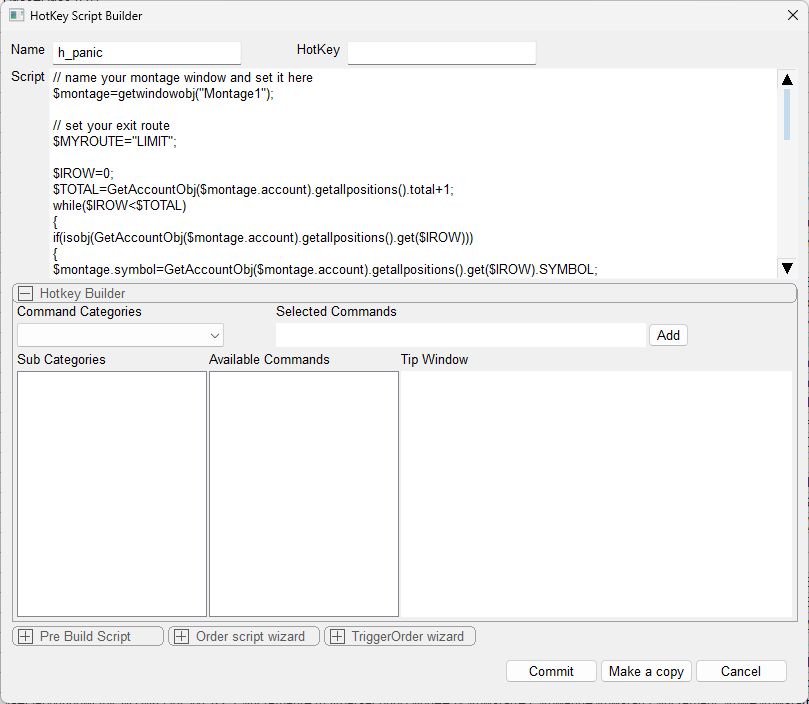
we will need the Exit all positions at once hotkey named "h_panic" https://www.guardiantrading.com/das-trader-pro-how-to-exit-all-positions-at-once/
With an alert like this

Read and monitor the current P&L
Read the P&L in real time
To retrieve the current realized value with a script
$PNLREALIZED=GetAccountObj($montage.account).realized;To retrieve the current unrealized
$PNLUNREALIZED=GetAccountObj($montage.account).unrealized;To retrieve total PnL
$PNLTOTAL=GetAccountObj($montage.account).NetPL;or calculate it
$PNLTOTAL=GetAccountObj($montage.account).realized+GetAccountObj($montage.account).unrealized;Monitoring Account Variables
Because native alert functions are built directly into the platform, using them is the most efficient method for tracking real-time P&L. For specialized or custom applications, you can apply the alternative monitoring techniques outlined above, combining them with the techniques in the previous post https://www.guardiantrading.com/das-trader-pro-monitoring-a-variable/
Selecting the P&L Evaluation Metric
The decision comes down to whether you want your logic to act on Unrealized P&L alone or the combined Total Daily P&L (Unrealized + Realized).
For instance, if you have two open positions—one up +$100 and another down -$50—your net open unrealized total sits at +$50.
1. Acting on Open Unrealized P&L (Max Unrealized Loss)
This method aggregates the floating unrealized gains and losses across all currently open positions simultaneously to enforce your maximum risk limit.

Important Account Configuration Notes
Please note that this configuration must be account-specific, as indicated by the ACC parameter line above.
Additionally, the configuration as shown below will fail to function properly for this setup:

2. Acting on Total Daily P&L (Unrealized + Realized) — Max Daily Loss
If you manage or execute trades across multiple accounts simultaneously, your risk parameters must explicitly account for those separate sub-accounts in the total calculation.


See it in action
On the video above, you can see 3 positions opened, which get all closed when the predefined max unrealized of -$50 is reached.
Key Best Practices and Pre-Deployment Checklist
Panic Script Verification: Ensure the panic/emergency exit script hotkey is tested and functioning reliably.
Alert Flag Audit: Double-check that all state flags and alert parameters are accurately configured.
Dual-Environment Testing: Validate script performance in both demo and live trading environments using minimal position sizes, as live routing requirements can differ from simulated execution.
Failsafe Risk Layering: Deploy these custom scripts alongside the platform's native risk controls. Set the native limit slightly higher than your script's threshold so it functions as a secondary safety net without disrupting your primary risk controls.
For more advanced scripting, you can visit my Substack - Peter's Substack where I elaborate on the newest features, ideas and do custom solutions for specific needs.
Author: PeterB
Disclosure Statement 1. Hotkey scripts should always be thoroughly tested in a paper trading environment prior to any live deployment. Guardian Trading assumes no responsibility for errors, malfunctions, or financial losses arising from the use, misuse, or modification of custom hotkey configurations. Traders are solely responsible for the creation, testing, and implementation of their own scripts.This guide is provided for informational and educational purposes only and does not constitute trading advice or an endorsement of any specific configuration. The examples herein are illustrative in nature and should not be copied, replicated, or relied upon without independent verification and testing. Use of this material constitutes acknowledgment and acceptance of these terms.
2. No information provided by Velocity Clearing, LLC (“Velocity” or the “Firm”), directly or indirectly, should be considered a recommendation or solicitation to adopt any particular trading or investment strategy or to invest in, or liquidate, a particular security or type of security. Information provided by Velocity on its Twitter, Facebook or Blog pages is for informational and educational purposes only and is not intended as a recommendation of any particular security, transaction or strategy. Commentary and opinions expressed are those of the author/speaker and not necessarily those of the Firm. Velocity does not guarantee the accuracy of, or endorse, the statements of any third party, including guest speakers or authors of commentary or news articles. All information regarding the likelihood of potential future investment outcomes are hypothetical. Future results are never guaranteed. Any examples that discuss potential trading profits or losses may not take into account trading commissions or fees, which means that potential profits could be lower and potential losses could be greater than illustrated in any example. Users are solely responsible for making their own, independent decisions about whether to use any of the research, tools or information provided, and for determining their own trading and investment strategies.